Key Takeaways
The WhatsApp Business API means the Cloud API now — Meta officially sunset the self-hosted On-Premises API on October 23, 2025, so there's no server, Docker, or database checklist to worry about anymore.
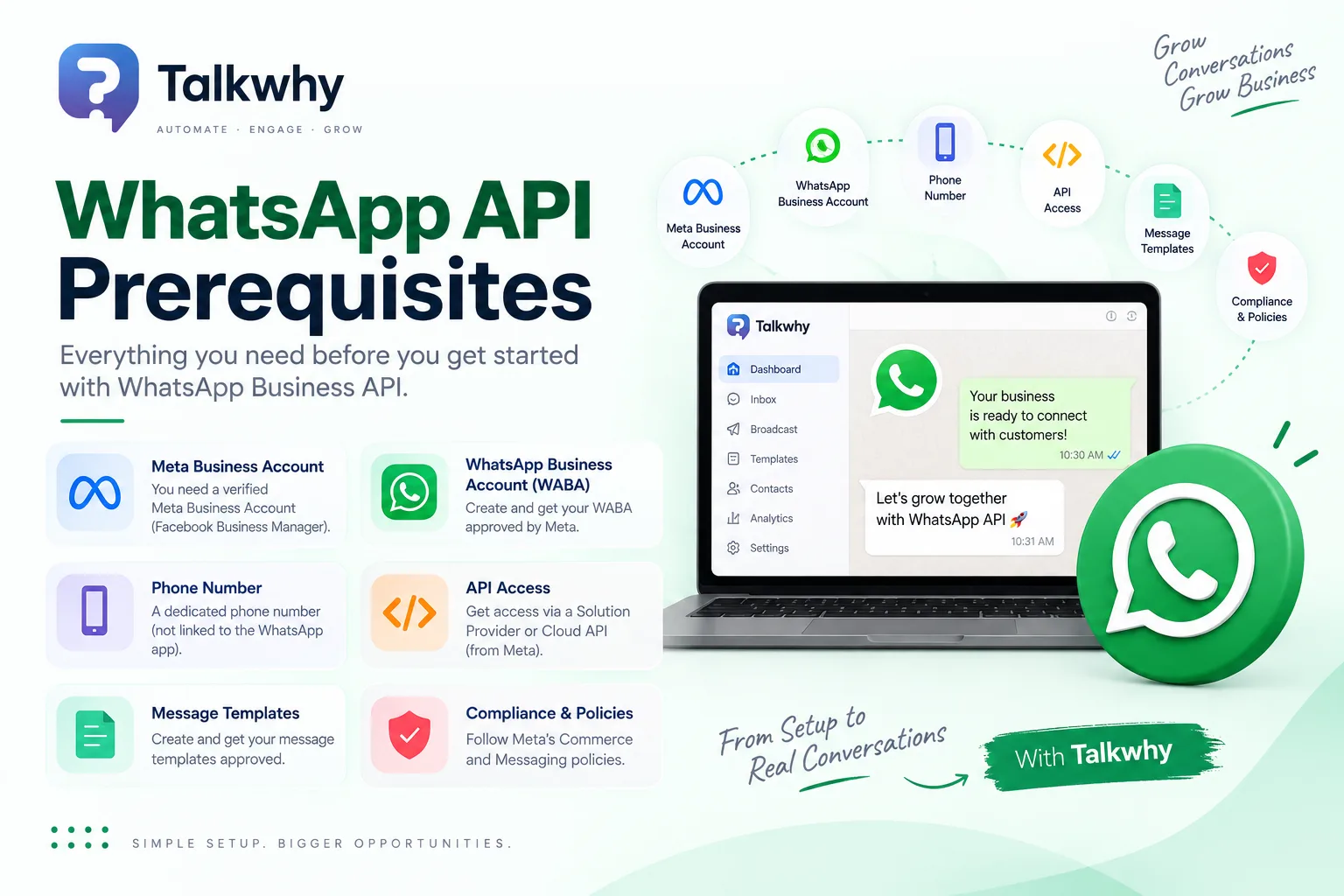
You need five things before you can send a single message: a Meta Business Portfolio, a WhatsApp Business Account (WABA) with a phone number attached, an access token, a webhook endpoint, and (eventually) Business Verification to unlock higher messaging limits.
Your existing business number doesn't have to choose between the WhatsApp Business app and the API. Meta's Coexistence feature lets both run on the same number at once, syncing roughly six months of chat history — though it caps throughput at a fixed 20 messages per second, well below what a dedicated API number can reach.
Most businesses onboard through Embedded Signup, Meta's one-click flow that provisions the Business Portfolio, WABA, phone number, and token together — typically in minutes rather than the multi-day manual setup this used to require.
Business Verification isn't mandatory to start testing, but it's required to move past the starting messaging tier and to send certain template categories at scale.
A Business Solution Provider (BSP) like TalkWhy absorbs most of the technical setup — token handling, webhook hosting, number status checks — so the prerequisite list gets a lot shorter in practice than it looks on paper.
If you're about to move a business number onto WhatsApp's official API, it helps to know exactly what Meta requires before you begin — not just so onboarding goes faster, but so you don't end up mid-setup discovering you needed a document, a decision, or a webhook you didn't know about. Here's the current, accurate list.
The Big Change You Should Know About First: There's Only One API Now
If you've read older guides, you may have seen a split between "Cloud API" and "On-Premises API," each with its own setup checklist. That split is gone. Meta officially retired the On-Premises API on October 23, 2025 — the final client version stopped working, and phone numbers can now only be registered for the Cloud API. Attempting to register a number for On-Premises use simply returns an error.
Practically, this means every prerequisite involving your own servers — Docker containers, a database layer, network configuration, log management — no longer applies to anyone starting fresh. Cloud API is hosted entirely on Meta's infrastructure. What's left to prepare is account setup, not server setup.
The Five Things You Need Before You Send a Message
1. A Meta Business Portfolio
Every WhatsApp API integration is managed through Meta's Business Portfolio (what used to be called Business Manager). This is the account layer everything else attaches to — your WABA, your phone numbers, your payment method, and eventually your verification status all live inside it.
If you're onboarding through a BSP, this step is usually folded into a guided flow rather than something you configure by hand in Meta's own interface first.
2. A WhatsApp Business Account (WABA) and a Phone Number
You need at least one phone number registered to a WABA. Here's where the real decision point sits, and it's worth getting right before you start:
Option A — Register the number fresh for the API (standard migration). If the number isn't currently active in the regular WhatsApp or WhatsApp Business consumer app, this is straightforward: register it directly for Cloud API use.
Option B — Keep the number in the WhatsApp Business app too, via Coexistence. If the number already has an active presence in the WhatsApp Business app and you don't want to give that up, Meta's Coexistence feature lets the consumer app and the Cloud API run on the same number simultaneously. A few specifics worth knowing:
The WhatsApp Business app on that device needs to be version 2.24.17 or later.
Roughly six months of existing chat history syncs across to the API side.
To stay compatible with the consumer app, a number running Coexistence is capped at a fixed throughput of 20 messages per second — noticeably lower than what a dedicated, API-only number can scale to over time.
The switch itself finishes with a confirmation step on the phone (a QR scan or in-app prompt), not purely through a dashboard.
Standard migration (API only) | Coexistence (app + API) | |
|---|---|---|
Existing WhatsApp Business app | Must be deregistered from the number first | Stays active alongside the API |
Chat history | Starts fresh on the API | Roughly 6 months syncs across |
Throughput | Scales with your tier over time | Fixed at 20 messages/second |
Best fit | New numbers, or a full move to API-based tooling | Small teams not ready to give up the app |
Neither option is objectively better — it depends on whether your team is currently living inside the consumer app day to day, or ready to move that workflow into a dedicated platform.
3. An Access Token (System User Token)
Every API request needs an access token for authentication. For anything beyond quick testing, that means a system user access token rather than a short-lived personal token — system user tokens don't expire on the same rolling basis and are the standard for production use.
If you're onboarding through Embedded Signup with a BSP, token generation and renewal are typically handled for you automatically; if you're integrating directly with Meta, you'll generate and rotate this yourself through Business Settings.
4. A Webhook Endpoint
You need a secure, HTTPS webhook URL to receive inbound messages, delivery statuses, and account events — Meta pushes data to you rather than you polling for it. This has to be a valid, SSL-secured endpoint; Meta's Embedded Signup implementation explicitly requires the hosting domain to support HTTPS before the flow will even register it.
If you're not running your own backend, a BSP typically provides and manages this endpoint for you, which removes the need to stand up and maintain webhook infrastructure yourself.
5. Messaging Limits and (Eventually) Business Verification
You can start sending at the entry-level messaging limit without full verification. But two things push you to complete Business Verification sooner rather than later:
It's one of the recognized paths to your first tier increase (the other being sustained, high-quality sending volume over time).
Certain template categories and higher-trust features are gated behind it.
Verification means submitting business information and supporting documentation for Meta's review — plan for this as a parallel track you start early, not a last step you scramble for once you're already sending campaigns.
How the Onboarding Flow Actually Runs
Once the prerequisites above are understood, the onboarding sequence looks like this in practice:
Review the platform basics first. Even a few minutes with Meta's own documentation on message types, template categories, and pricing saves you from surprises later — especially around what counts as a template versus a free-form message.
Decide: direct integration with Meta, or a Business Solution Provider. Going direct means you handle Business Portfolio setup, tokens, webhooks, and template management yourself. A BSP folds all of this into a guided flow and adds a workspace on top — inbox, automations, analytics — that the raw API doesn't include.
Complete Embedded Signup. This is Meta's standard onboarding flow: you authenticate your Meta account, connect or create the Business Portfolio, create or connect the WABA, and register (or reconnect, for Coexistence) your phone number — usually in one continuous flow rather than separate manual steps.
Start Business Verification in parallel. Not required to send your first test messages, but start the documentation process early since review can take time and gates your path to higher messaging limits.
Fill out your business profile. Company name, address, description, and website populate what customers see on your WhatsApp business profile — this is also where product catalogs get configured if you're selling directly through chat.
Configure the API (or your BSP dashboard) and connect it to the rest of your stack. CRM, helpdesk, e-commerce platform — whatever your customer data already lives in is worth connecting before your first real campaign, not after.
Where Businesses Usually Trip Up
A few recurring mistakes are worth flagging before you start:
Not deciding on Coexistence vs. migration up front. Teams sometimes register a number for the API only to realize afterward they wanted to keep using the consumer app too — which means undoing part of the setup rather than choosing the right path from the start.
Leaving Business Verification until messaging limits become a problem. Verification review isn't instant. Starting it only after you've outgrown the entry tier means a gap where campaigns are throttled while you wait.
Assuming a webhook is optional. It isn't, unless a BSP is providing one for you — without it, you can send messages but you won't reliably receive delivery statuses or inbound replies.
Treating this like the old On-Premises checklist. If you're referencing an older guide or a colleague's notes from a couple of years back, drop anything about servers, containers, or self-hosted infrastructure — none of it applies to Cloud API.
Where TalkWhy Fits In
Everything above is Meta's requirement list, not any platform's — but a BSP is specifically what turns a five-item technical checklist into a guided signup. TalkWhy's onboarding is built around exactly that:
Guided Embedded Signup, so connecting your Meta Business Portfolio, WABA, and phone number happens through one flow instead of separate manual steps.
A managed webhook endpoint, so you're not standing up and maintaining your own HTTPS infrastructure just to receive messages.
Automatic token handling, removing manual system-user token generation and rotation from your team's plate.
A shared WhatsApp inbox and automation rules, live as soon as your number is connected, so onboarding ends with a working workspace rather than just a functioning API connection.
Knowledge-base-trained AI replies and multilingual conversation handling, useful from day one if your customer base spans regions or languages.
A developer API, if your team wants to build custom logic on top once the core setup is done.
Role-based permissions with MFA, SOC 2 Type II compliance, and AES-256 encryption, covering the account-security side as more people get access to the number.
You can start with a free trial and no credit card required, and current plan details are on the TalkWhy pricing page.
Frequently Asked Questions
Do I need to build and host my own server to use the WhatsApp API in 2026?
No. That requirement belonged to the On-Premises API, which Meta officially sunset on October 23, 2025. The Cloud API is hosted entirely by Meta — your prerequisites are account and configuration steps, not infrastructure.
Can I keep using the regular WhatsApp Business app after connecting the API?
Yes, through Meta's Coexistence feature, if your number is already active in the WhatsApp Business app. Both run on the same number, with roughly six months of chat history synced across. The trade-off is a fixed 20 messages/second throughput cap, lower than what a dedicated API-only number can eventually reach.
Is Business Verification required before I can send anything?
No, you can start testing at the entry-level messaging limit without it. But verification is one of the two recognized paths to your first tier increase, and it's required for some template categories and higher-trust features, so it's worth starting early rather than waiting.
What's the difference between registering a number fresh and using Coexistence?
Fresh registration requires deregistering the number from the WhatsApp/WhatsApp Business consumer app first, and your chat history starts over on the API. Coexistence keeps the consumer app active on the same number and syncs existing history across, at the cost of a lower fixed throughput ceiling.
Do I need to write my own webhook handler?
Only if you're integrating directly with Meta. A Business Solution Provider typically provides and manages the webhook endpoint for you, so you receive messages and delivery statuses through their platform instead of hosting your own HTTPS listener.
Is a system user access token different from a regular access token?
Yes. Regular user tokens are short-lived and tied to an individual's session; system user tokens are built for production integrations and don't expire on the same rolling basis, which is why they're the standard choice once you're past initial testing.